
Trading from a signal
This guide covers how to enter a position from a signal you already have, using the Signal tab in the order panel. You paste the signal, Trader Pending reads it for you, and then you review and decide how the order is placed. The signal comes from you; the platform helps read it and forwards it to your own exchange account through your own API key. Trader Pending neither judges nor guarantees the quality of a signal.
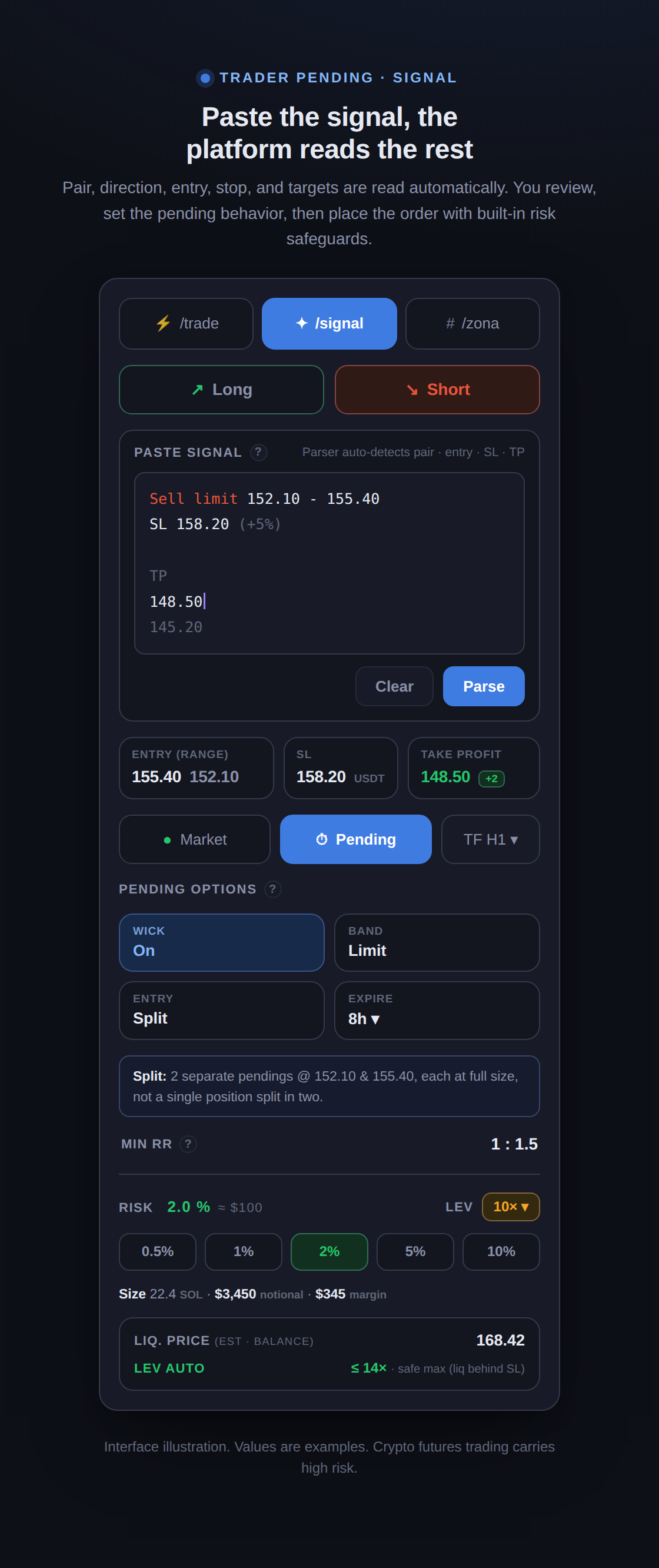
1. Paste and read the signal
Section titled “1. Paste and read the signal”Open the Signal tab, then paste your signal as plain text. The parser reads the pair, direction, entry, stop-loss, and targets automatically, so you do not need to reformat anything.
- Pair is auto-detected. If the text names a pair, the platform recognizes it and sets up the instrument.
- Single entry or a range. If the signal gives an entry range, both ends are read as the lower and upper bounds. How that range is treated is something you set in the next step.
- Stop and targets. The stop-loss is read as one price. More than one target is supported, up to three levels, for partial closes.
- Always editable. Every value that was read can be changed manually before you continue. What shows in the field is what will be used.
An example of text that gets read:
Sell limit 2.150 - 2.210SL 2.285TP 2.05 1.98 1.902. Choose how to enter: Market or Pending
Section titled “2. Choose how to enter: Market or Pending”- Market. Enter now at the current price. Good when price is already in the entry area and you want to execute right away.
- Pending. Wait until price reaches the entry, then fill. Good when price has not arrived yet. The order waits on the exchange until it triggers or its validity expires.
3. Set how the pending order behaves
Section titled “3. Set how the pending order behaves”If you choose Pending, a few options decide how the order triggers and fills. All are optional, and the defaults are already safe for most cases.
- Entry (for a range). Decides how a range is treated:
- Zone: the whole range becomes the trigger band, one position.
- Mid: a single entry at the midpoint of the range.
- Split: two separate pending orders at the lower and upper bounds, each at full size, not one position divided in two. Once one side fills, the other adjusts.
- Band. The shape of the trigger zone around the entry:
- Limit: the band extends from the entry toward the stop, triggering when price enters the band.
- Symmetric: the entry plus and minus a percentage tolerance (set in the Tol field, default 0.5%), for a more precise entry.
- Wick filter. When on, the order triggers only when a candle wick touches your price and then closes back away, not merely grazes it. This filters out false triggers from candle wicks.
- Timeframe. The candle the bot watches to confirm a trigger. A higher timeframe gives a stronger confirmation but is slower.
- Expiry. If it has not filled by the time limit, the pending order is cancelled automatically, so an old signal does not linger.
4. Safeguards before and after sending
Section titled “4. Safeguards before and after sending”- Risk-reward is shown. The minimum RR appears before the order is sent, so you know the reward against the risk up front.
- Slippage guard. If the market has already moved far from the planned entry, a Market execution is rejected automatically and you are offered choices: switch to Pending so the bot waits for price to return to the entry area, reset the entry to the current price, or cancel if the setup has already been missed.
- Leverage keeps distance from liquidation. In Signal mode, leverage is capped automatically to the safest value, the highest leverage that keeps your liquidation price behind your stop-loss. If you pick higher, the system brings it back down. The reason is simple: the thing that closes the position first on a loss should be your stop, not exchange liquidation. This cap follows your stop distance, so a wider stop yields a lower leverage cap.
- Stop-loss on the exchange. The stop is placed directly on the exchange, so it stays in effect even if the bot connection drops. Take-profit runs automatically, including partial closes for layered targets.
Crypto futures trading carries high risk, including the possibility of losing part or all of your capital. The signal comes from you, and Trader Pending neither judges nor guarantees its quality. Everything here helps you stay disciplined and shows the consequences honestly, then leaves the decision entirely to you.